Every emailed order read, checked, and entered.
Customer orders that arrive by email, PDF, or spreadsheet are read as they land, checked against your system, and entered, and the exceptions go to your team.
- After launch
- We keep it running
- Runs on FlowRunner
- Billed separately
What you get
-
Every order read
Email, PDF, or spreadsheet, in every customer's layout.
-
Checked against your system
Each line checked, using your rules.
-
Entered for you
What checks out goes straight into your TMS, WMS, or ERP.
-
Customers confirmed
A confirmation goes out once the order is entered.
-
Exceptions where you work
A helpdesk ticket, Slack, text, or email.
-
A record of everything
Every order and every decision, with who decided and when.
How it runs
One real example, start to finish.
- Runs on its own
- A person on your team decides
-
Order arrives
A customer emails a PDF order at 8:31 a.m., and it is read line by line.
-
Checked
Each line is checked against your system.
-
Your desk decides
A person decidesThe line with no part number goes to your order desk.
-
Entered
The order is entered, and the customer gets a confirmation.
What changes for your team
Your order desk stops retyping orders.
They handle the exceptions and spend their time on customers.
You stay in charge.
The routine runs on its own. At these moments it stops, asks a person, and waits for the answer.
-
An order has an unknown item, a bad address, or something unusual.
A ticket in your helpdesk, a Slack message, a text, or an email to your order desk
-
An order looks like a duplicate.
Held and sent to your order desk
You set the rules, and can change them any time
- Which inboxes and customers go first.
- What must check out before an order is entered.
- Who decides what, by customer or item.
- Where each decision lands: your helpdesk, Slack, text, email, or a review screen.
What we'll need from you
- Admin login to each inbox the documents arrive inAP or operations lead
- Access to your TMS, WMS, ERP, or accounting systemOperations or IT lead
- A FlowRunner account and an AI provider account in your company's nameOperations lead, with us on the call
- Your checks and limits, who decides what, and a sample of real documents for the test runAP or operations lead
- Review of the test run and your go-aheadOperations lead
Works with what you already use
- Gmail
-
 Outlook
- Your TMS or WMS
- Your ERP or accounting system
- NetSuite
- QuickBooks Online
- Zendesk
- Slack
- Text messages
Product names and logos are trademarks of their owners. Midnight Flow is not affiliated with or endorsed by them.
80% less time
on 125 emails a day at a mental health transportation provider, with every request read and entered.
Read the case studyIt's working fantastically. Of all the things we've built, this is the one that I've been told, 'We'll be upset if you take this away from us now.'
The details
Included
- Every customer order picked up as it arrives, by email, PDF, or spreadsheet.
- Each order read line by line, in every customer's own layout.
- Each line checked against your system, using the rules you set.
- Orders that check out entered in your TMS, WMS, or ERP.
- Unknown items, bad addresses, and anything unusual sent to your team where they already work.
- A confirmation to the customer once the order is entered.
- A record of every order and every decision.
- A test run on your real orders before go-live, and a walkthrough for your team.
Not included
- Orders placed by phone. We work with orders that arrive digitally.
- Changes to your TMS, WMS, or ERP setup beyond reading records and entering orders.
- Customer pricing and contract terms, which always come from you.
- Your FlowRunner subscription and AI model usage, which are billed separately.
- Ongoing changes after launch, which are covered by the care plan or priced per change.
After launch, we keep it running.
On our care plan
We monitor it, fix it, and make your changes, with a named contact. Your team does nothing.
Unlimited changes to what we built, cancel any month
Or run it yourselves
We hand it over and train your team on what it does and what to do if something looks off.
Changes later, scoped with you
It keeps running. Your automation lives in a FlowRunner account in your business's name, so it never depends on us, and we hand everything over to you or whoever you choose.
Want this built for you?
A 30-minute call. Bring one real document. We keep it running.
We do the build: setup in your accounts, tuning on your own past data, and training your team. FlowRunner runs it from there. How we work
Two separate bills apply: your FlowRunner subscription, billed by FlowRunner at your volume, and your AI model usage, billed by your AI provider. We set both accounts up for you. See FlowRunner pricing.
Frequently asked questions
Do customers need to change how they order?
No. They keep sending orders the way they do today.
How do we know it read an order correctly?
We test it on your real orders before go-live, and you review the results. After launch, anything that does not check out goes to your team.
Ready to scope this for your office?
Book a call to confirm the scope and the start date, or send a fit check and we will reply with next steps.
This customer order just landed in your inbox.
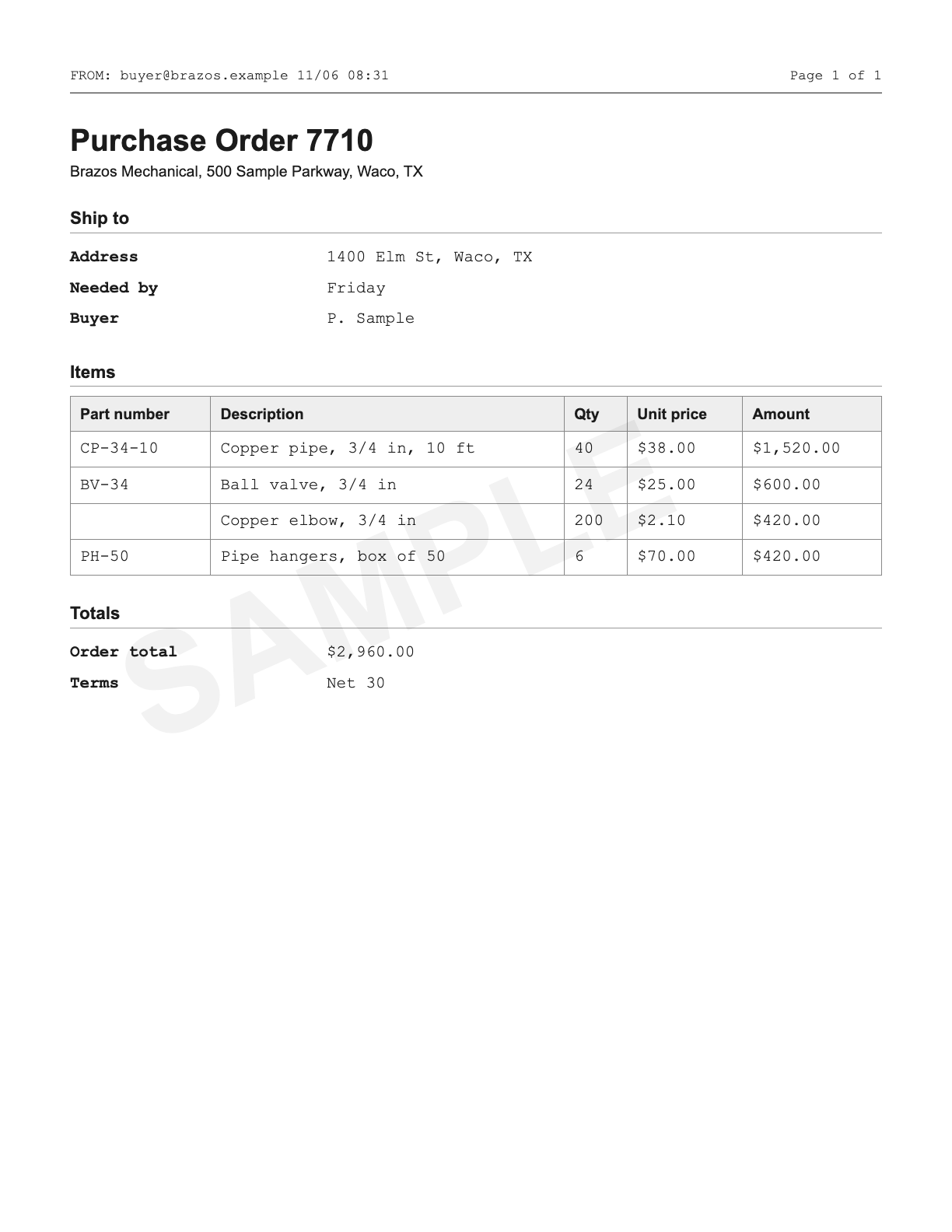
PDF or photo, deleted once read.